Choose your deployment path
ValueLens uses one shared value model, but page availability varies by deployment path. The paths also differ in how data gets in and refreshes. Pick the one that matches your setup; you can move to a fuller path later.
The three paths at a glance
| Path | Pick this when | What you need |
|---|---|---|
| SharePoint — simplest | You want the fastest start on Power BI Pro — no Fabric or Premium capacity. | A scheduled PowerShell extract that rolls up two CSVs to SharePoint, then a Power BI scheduled refresh. |
| Fabric — standard, recommended | You have Fabric capacity (or Premium / PPU), or any Spark + SQL stack. | Notebooks shape the data into a Lakehouse for the best performance and sub-second pages, plus the optional billing and feedback pages. |
| Fabric Extended (Fabric + Copilot Studio) — advanced | You run Copilot Studio agents and want the deeper agent, topic, and evaluation pages. | Everything in the Fabric path, plus the Copilot Studio transcript and PPAC credit layer. Stand up the Fabric path first, then add this. |
Prerequisites and capacity
CopilotScope uses one shared data model and one refresh. The licences and capacity differ by path:
- Microsoft 365 Copilot licences for the population you want to measure (all paths).
- Power BI Desktop to open and refresh the template (all paths).
- SharePoint path — no Fabric capacity required; a flat-file / scheduled-script landing to a SharePoint library.
- Fabric path — a Fabric capacity (F2+ or trial) for Spark ingestion and the Lakehouse SQL endpoint. Best for scheduled ingestion, larger volumes, and the PPAC billing pages.
- Fabric Extended — the Fabric prerequisites, plus Dataverse read access to the Copilot Studio
ConversationTranscripttables.
Which path should I choose?
- Start with SharePoint if you only have Power BI Pro — it runs the full core dashboard.
- Choose Fabric if you have capacity — it also runs the full core dashboard with better performance and unlocks the optional billing and feedback pages.
- Only reach for Fabric Extended once you are running Copilot Studio agents and want the agent transcript, topic, and evaluation pages.
Standard Fabric architecture
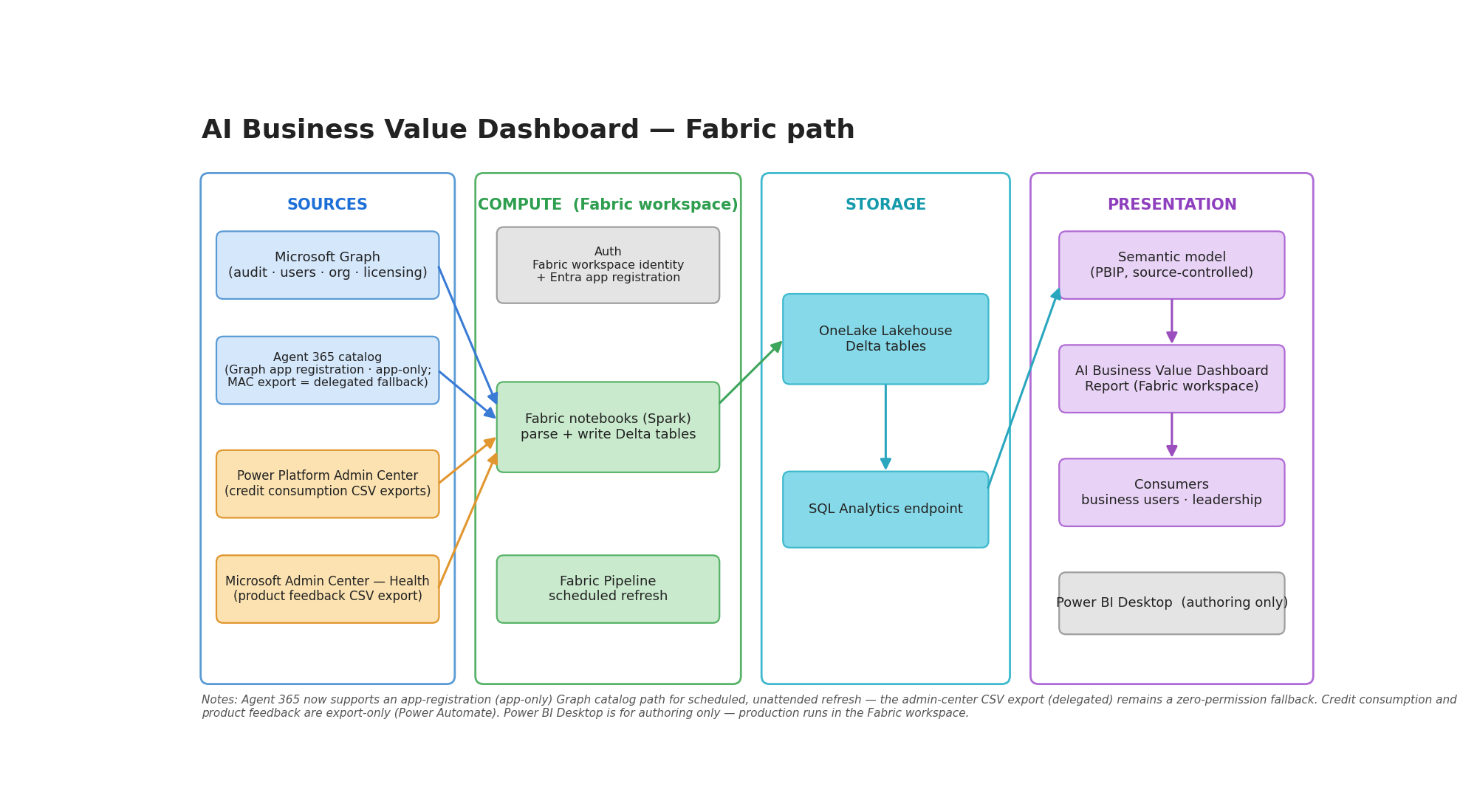
On the Fabric path, notebooks pull your Copilot data from Microsoft Graph and write Delta tables into a Lakehouse; the Power BI template is a thin client over the Lakehouse SQL endpoint, so the heavy JSON parsing happens in Spark and the dataset stays small and fast.
Fabric + M365 — coming soon
A Fabric + M365 work-pattern build — Microsoft 365 work-pattern signals across a shared usage-mode spine, personas, and AI-readiness headroom — is coming soon. It is not ready yet and has no setup procedure in this release.